Integration
Integration options
We see the integration of third parties as a key success factor in the implementation of a project. MyTower offers three ways to integrate with customer systems:
-
ETL: MyTower relies on Stambia, a market ETL tool, to manage file-based interfacing with customers. This mode of integration supports
-
File exchange in any format: XML, CSV, Excel, JSON... etc.
-
Consumption of customer webservices requiring post-transformation of data before integrating it into MyTower
-
Security of exchanges: SFTP (customer or server depending on the customer), HTTPS
-
-
Webservices/API: MyTower interfaces are often available through API. MyTower can expose its APIs to customers. In this mode:
-
Data exchange via a Rest API
-
Secure API with OAuth2 on HTTPS
-
-
Bus Message: This mode allows the exchange of messages in an asynchronous way on the Kafka bus of MyTower
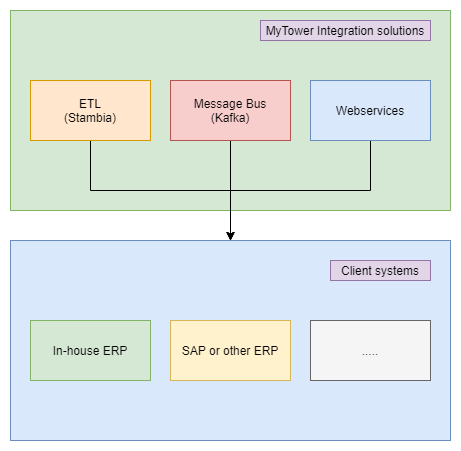
This integration architecture allows us to flexibly cover all integration needs with ERP or legacy systems.
Integration patterns used by GTM modules
Customs Tracker is designed to receive operational events from enterprise systems and to pass controlled outputs to downstream MyTower modules and external parties. MyTower uses an integration middleware layer based on Apache Airflow to separate the business data model from broker- or system-specific technical interfaces.
| Integration area | Position |
|---|---|
| Inbound operational events | ERP, TMS and other logistics/transaction sources; real-time/near-real-time or scheduled exchange depending on source-system capability. |
| Layer 2 trade data | Approved classification, origin, valuation and other trade-position data can travel with the transaction or be compared against an optional MyTower Trade Master Data mirror. |
| Downstream declaration handoff | Accepted customs events can create draft declaration objects in CBM for controlled release and broker collaboration. |
| Integration patterns | REST API / JSON, EDI and SFTP / structured file exchange; broker- or country-specific transformations can be handled in the integration layer. |
| Customs data model | For customs declaration exchange, MyTower uses a canonical data model based on WCO Data Model and EUCDM principles, with customer-specific extensions where required. |
| Analytics handoff | Reporting data is replicated to a dedicated BI layer for Power BI rather than running analytical workloads directly on the transactional production database. |
Example: Declaration API
The Customs Broker Management module exposes REST APIs for programmatic declaration management:
REST APIs for programmatic declaration management:
-
Create declaration — API creates a new declaration with full JSON payload
-
Update declaration (full) — replaces the entire dataset of an existing declaration
-
Update declaration (partial) — updates specific fields (status, date, error message) without overwriting existing data
-
Key identifiers — Technical ID, shared broker key, and LRN for unique identification
-
JSON format — all API payloads follow the EU CDM JSON schema; external format conversion handled by integration layer (Airflow)