Customs Tracker / Bonded Warehouse
End-to-end tracking of customs-controlled stock and movements, including bonded warehouse stock, duty payment management, reconciliation and audit evidence.
At a glance
| Area | Description |
|---|---|
| Purpose | Tracks incoming and outgoing goods under customs control, maintains bonded/free stock records, determines consumption modes, supports release to free circulation and reconciles MyTower customs stock with ERP physical stock. |
| Typical inputs | ERP movements, stock snapshots, warehouse locations, article batches, quantities, values, origin, preference, customs codes and transport costs. |
| Typical outputs | Customs stock ledger, release transactions, duty payment declarations, CSD documents, stock discrepancy reports, movement history and audit logs. |
| Business value | Provides a customs stock safety net, supports bonded warehouse compliance, improves duty payment governance and gives customs teams reliable traceability for audits. |
Core capabilities
- Movement workbench with header, line, document and business rule details
- Real-time bonded and free stock records by article, batch and warehouse
- Incoming and outgoing procedure automation with traceability
- Consumption mode management for duty-paid and duty-unpaid flows
- Release Stock and e-globalization workflow for duty payment
- Stock comparison between ERP and MyTower customs stock
- Customs Status Document generation and archival
- Multi-context architecture reusable for customs and regulatory contexts
Overview
MyTower Customs Tracker is the upstream customs-control and orchestration component of the MyTower Global Trade Management platform. It receives operational events from ERP and logistics sources, determines whether they are relevant for customs processing, validates and enriches the required information, and routes exceptions to the appropriate user before the customs process continues.
The module is designed primarily for the customer's internal customs and compliance teams. External customs brokers do not operate in Customs Tracker. Once an upstream transaction has passed the required controls, the resulting customs event can be routed to Customs Broker Management (CBM) for declaration workflow and Layer 3 broker collaboration, or to optional customs-regime capabilities such as Customs Ledger where applicable.
Customs Tracker combines configurable Business Rules, lookup tables, an Error Worklist and customer-specific Procedures. This allows the platform to transform operational ERP events into controlled customs events without embedding broker-specific logic into the core process. The broader MyTower platform adds declaration management, collaboration, document management, analytics, access control and optional trade master data capabilities around this orchestration layer.
What the module is designed to achieve
-
Identify customs-relevant ERP and logistics events and ignore non-relevant transactions.
-
Validate completeness and configured consistency at transaction header and line level.
-
Enrich operational data using configurable rules and lookup tables.
-
Stop transactions with blocking issues and route them to an accountable worklist.
-
Support correction, resubmission and revalidation before downstream declaration processing.
-
Determine the appropriate customs process through configurable Procedures.
-
Provide auditable traceability of rules, corrections and processing history.
-
Support optional customs-regime monitoring, inventory visibility and stock reconciliation when required.
Customs Tracker is not the customs broker portal and does not replace the legal filing responsibility of Layer 3 providers. Broker collaboration, declaration lifecycle and filing-status feedback are managed in Customs Broker Management (CBM).
Capability overview and maturity
| Capability | Position | Description |
|---|---|---|
| Transaction intake and line-level visibility | Standard / live | ERP events, header/line data, processing status and customs-relevant attributes. |
| Business Rules and lookup tables | Standard / configurable | Relevance, completeness, validation, enrichment, routing and normalization. |
| Error Worklist | Standard / configurable | Blocking issues, assignment, ageing, correction, resubmission and revalidation. |
| Procedures engine | Standard / configurable | Customer-specific customs orchestration implemented through maintained Groovy scripts. |
| Visual / natural-language Procedure designer | Roadmap | User-facing configuration interface under development for planned delivery by end-2026. |
| Customs Ledger / regime inventory capabilities | Optional scope | Bonded/non-bonded stock visibility, regime movements, duty exposure and ERP reconciliation. |
| Broker declaration collaboration | Separate module | Managed in Customs Broker Management, not Customs Tracker. |
| Power BI analytics | Separate module | Reporting uses a dedicated BI layer to protect the transactional production environment. |
Functional Positioning in the MyTower GTM Architecture
Customs Tracker sits between operational source events and the downstream customs execution process. Its primary role is to establish whether a transaction should enter a customs process and whether the information is sufficiently complete and consistent to proceed.
| Operational Sources | Customs Tracker | Controlled Output | Downstream Modules |
|---|---|---|---|
| ERP / TMS / logistics events | Relevance, completeness, validation, enrichment | Accepted customs event | CBM - declaration workflow / broker collaboration |
| Optional Layer 2 trade data | Trade Position presence / consistency controls | Rejected transaction with root cause | Error Worklist - customer correction |
| Reference data / lookup tables | Procedures - customs path determination | Regime / ledger instruction | Customs Ledger / regime management (optional) |
Where classification, origin, valuation or other Trade Position data remains mastered in a customer Layer 2 system, MyTower consumes the approved values received with the transaction and does not independently change the authoritative Trade Position. If a Trade Master Data mirror is implemented in MyTower, additional comparison rules can be configured against the replicated reference data.
Transaction Management
The Transactions and Transaction Lines views provide the operational workspace for customs-relevant ERP events. Users can review transactions at header level and drill down to the associated line items. The objective is not to prepare a legal customs declaration in this screen, but to control the operational event before it becomes a downstream customs process.
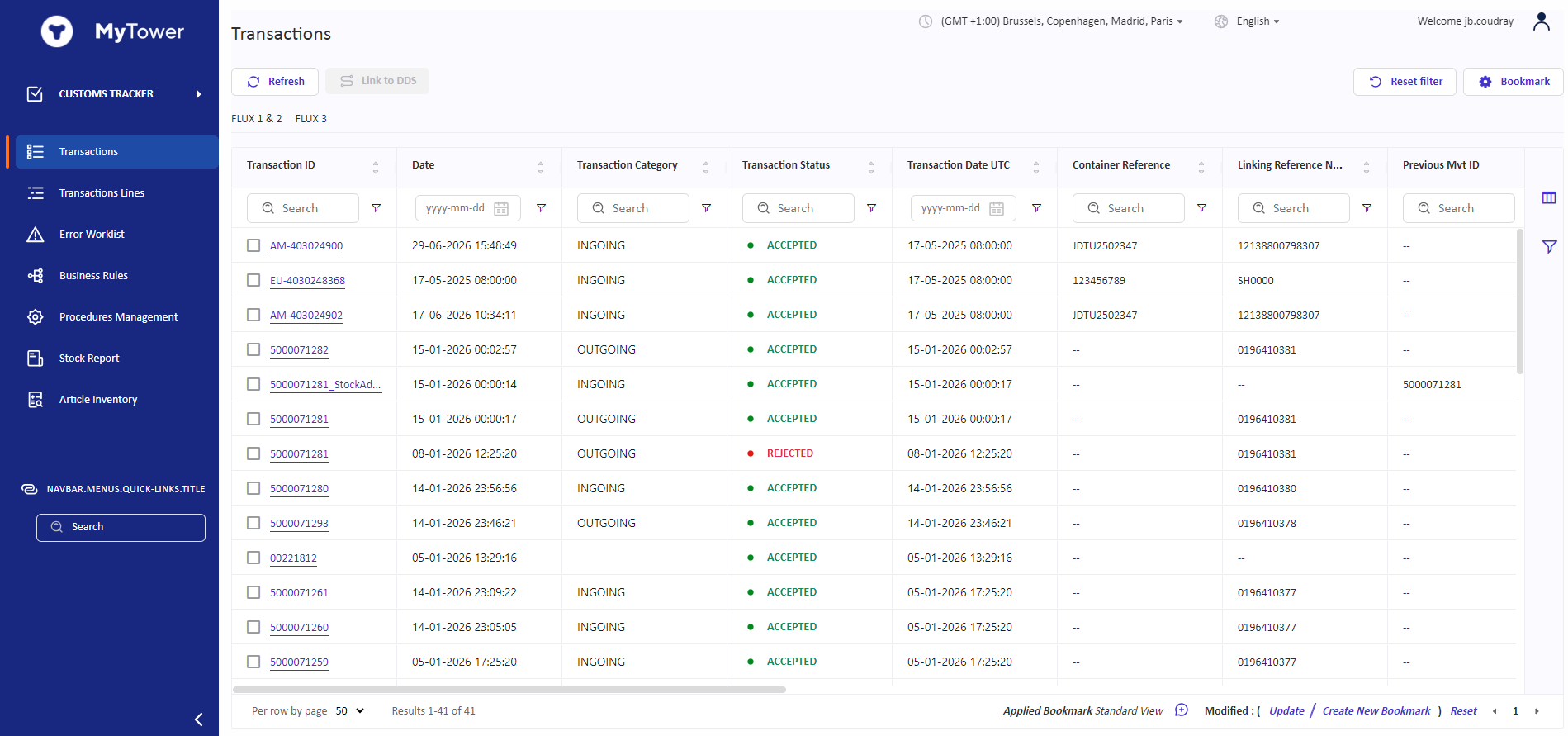
Example: Customs Tracker transaction overview showing received ERP events and processing status.
Core transaction capabilities
-
Header-level and line-level visibility for received transactions.
-
Search, filtering and bookmarks to focus operational users on the relevant population.
-
Visibility of transaction status, dates, references, logistics information and configured customs attributes.
-
Access to the Business Rules applied to a transaction and the resulting outputs / root causes.
-
Ability to distinguish accepted transactions from rejected transactions that require intervention.
-
Linking to supporting documentation or related business objects where the configured solution architecture requires it.
A transaction that passes the required upstream controls can be processed automatically. A transaction that fails a blocking control is not progressed to declaration processing and is routed to the Error Worklist.
Business Rules Engine
Business Rules provide the configurable control layer applied when transactions are received. Rules can evaluate both transaction-header and line-level data and can write results back to the appropriate target field or root-cause field. This allows the same framework to support relevance decisions, validation, enrichment and routing.
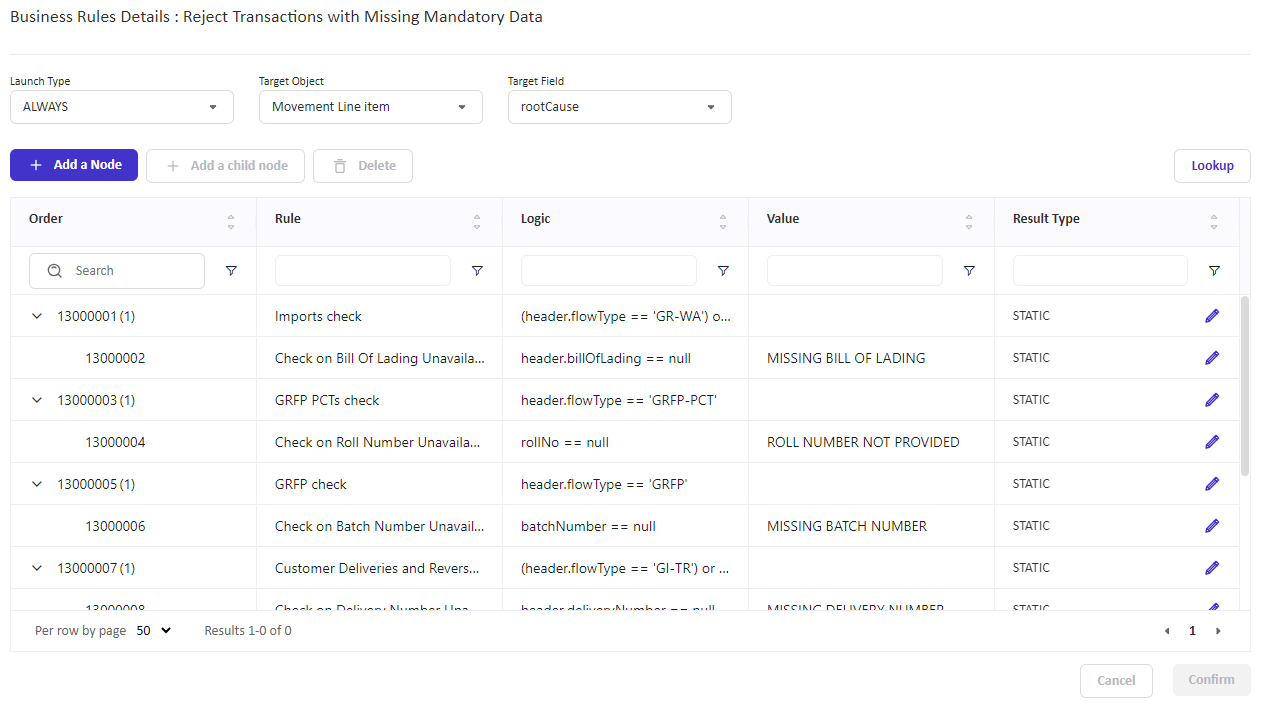
Example: configurable mandatory-data rules that can block a transaction and populate a specific root cause.
Typical rule patterns
| Rule purpose | Example use |
|---|---|
| Relevance | Determine whether the ERP event requires customs processing based on flow, country, movement type or other attributes. |
| Completeness | Verify mandatory operational or customs-relevant information such as transport references, quantities or required product data. |
| Trade Position presence | Check that approved classification, origin, valuation or other required Layer 2 data is present before progression. |
| Consistency | Compare configured fields or conditions and flag unexpected combinations. |
| Enrichment | Populate routing, contact, operator or other downstream values based on transaction attributes. |
| Normalization | Use lookup tables to standardize source values before further processing. |
| Broker routing | Derive the intended broker / route from country, flow, Incoterm location or other configured criteria without initiating broker collaboration in Tracker. |
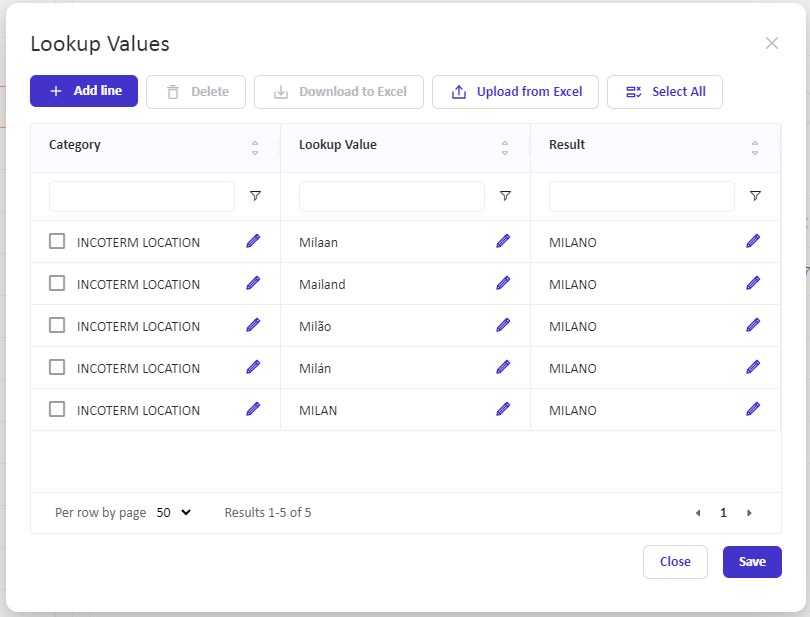
Example: lookup-table normalization of source values before downstream processing.
Business Rules and lookup tables are customer-configurable platform capabilities. The exact customer rule catalogue, thresholds, mandatory fields and escalation criteria are defined during solution configuration. Rules should not be confused with legal customs decision ownership, which remains with the customer for its approved Trade Position.
Error Worklist and Transaction Remediation
Transactions that fail a blocking control are held in the Error Worklist. The worklist is the operational exception-management mechanism for upstream data and process issues: users can identify the root cause, see how long the issue has been open, resolve the underlying problem and resubmit the transaction for processing.
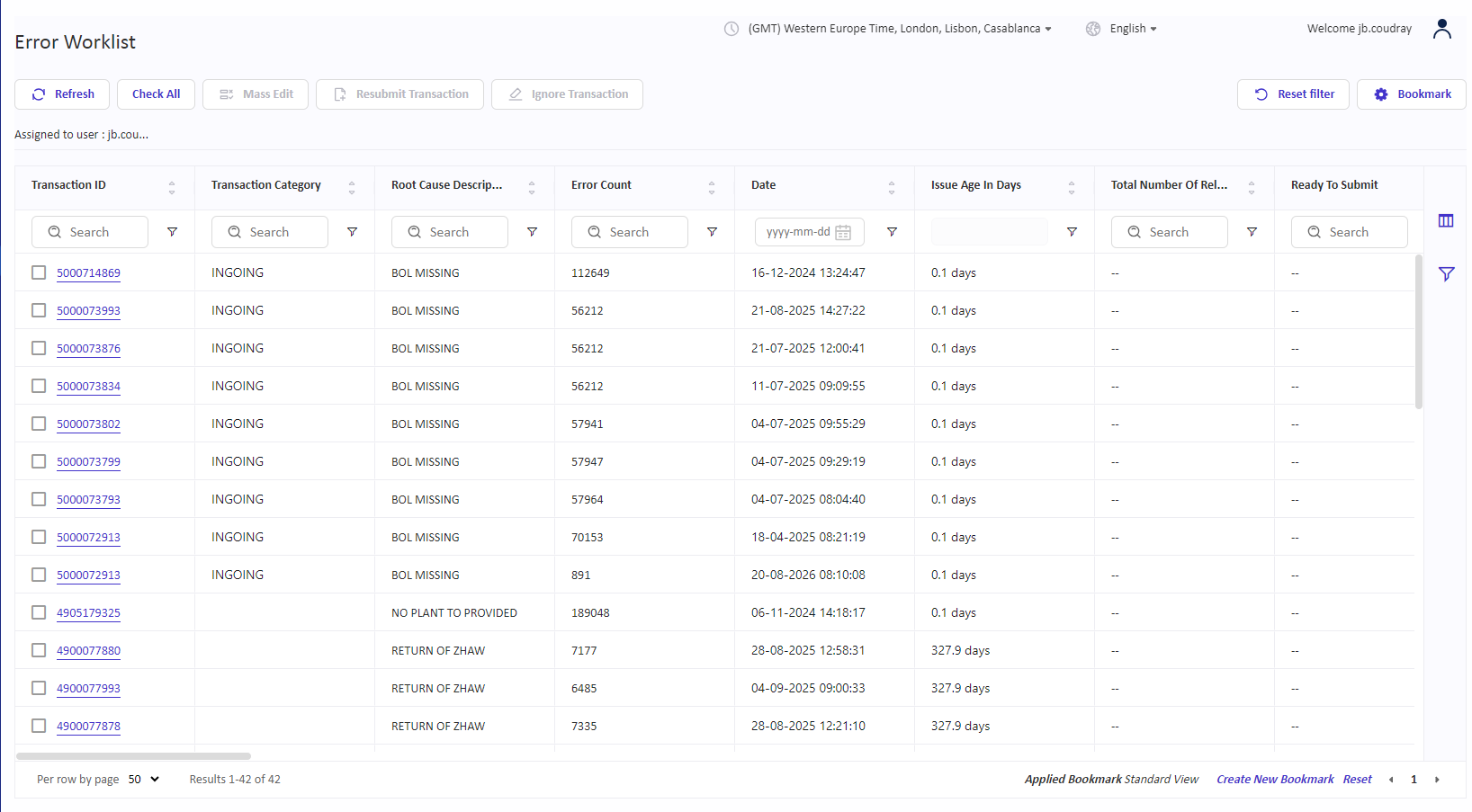
Example: Error Worklist with assigned population, root-cause descriptions and issue age.
Controlled remediation loop
-
Detection - a Business Rule or Procedure identifies a blocking issue.
-
Assignment - the transaction can be routed to the appropriate user or team according to the configured logic.
-
Correction - the user corrects the relevant information in MyTower or resolves the underlying source-data issue.
-
Resubmission - the transaction is resubmitted for processing.
-
Revalidation - the applicable Business Rules and Procedures are executed again before the transaction can continue.
No draft customs declaration is created in CBM until the upstream transaction has successfully passed the required controls. Actions and corrections are historized at user level, supporting auditability of the remediation process.
Procedures - Customs Process Orchestration
Once a transaction has passed the required Business Rules, the Procedures engine determines what customs process should follow. Procedures form the orchestration layer between an operational ERP event and the resulting customs declaration or customs-regime object.
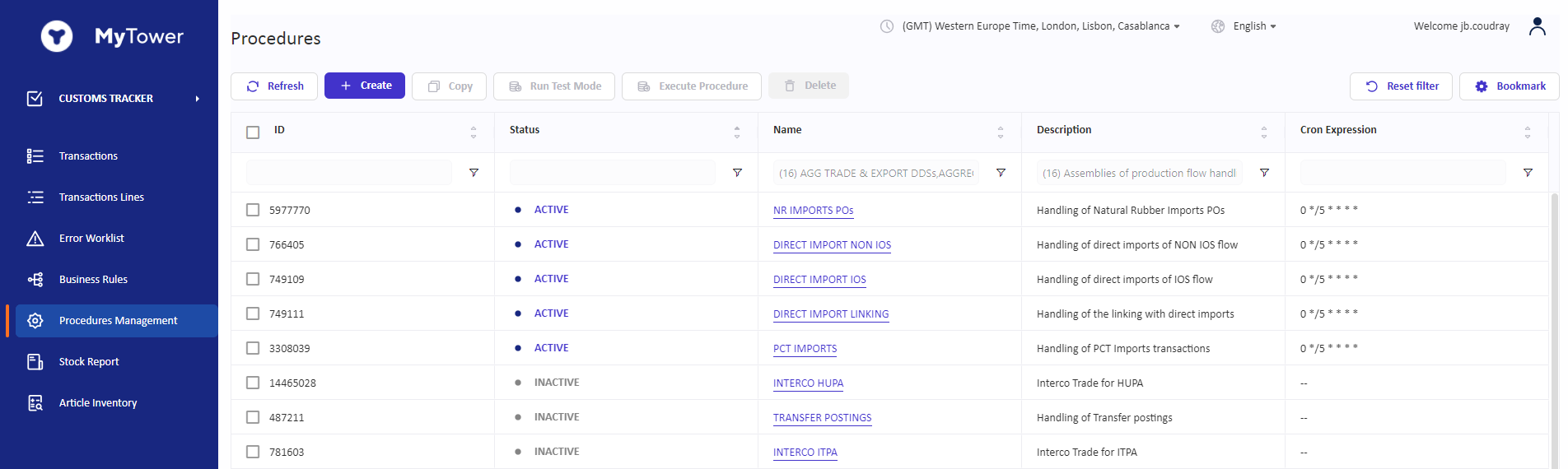
Example: Procedures Management view showing customer-specific customs orchestration procedures.
Current operating model
-
Procedures are customer-specific and apply customs decision logic to accepted transactions.
-
The current implementation uses editable Groovy scripts maintained as part of the configured solution.
-
Procedures can combine or reconstruct data across related movements, batches or inventory events where the source ERP does not provide the exact customs object required downstream.
-
Standard import/export flows can trigger creation of a draft declaration object in CBM.
-
Special-regime flows can be routed to optional Customs Ledger / regime-management capabilities when those are in scope.
A user-facing Procedure configuration interface using configurable blocks and natural-language editing is under development, with planned delivery by end-2026. Today, Procedures are therefore configurable customer-specific scripts rather than a fully self-service no-code workflow designer.
Optional Customs Regime and Ledger Capabilities
For customers that require customs-regime inventory management, MyTower can extend the upstream orchestration with Customs Ledger, Article Inventory and Stock Report capabilities. These capabilities are optional and are separate from the baseline transaction-control functions of Customs Tracker.
| Component | Purpose |
|---|---|
| Customs Ledger | Supports customs-regime movements, bonded/non-bonded inventory management and customs debt exposure where this capability is included in scope. |
| Article Inventory | Provides article-level visibility of customs-managed stock and related movement history. |
| Stock Report | Provides a consolidated view of customs-managed inventory and supports reconciliation against ERP inventory. |
| Procedures integration | Eligible transactions can be routed to the Ledger and can generate the corresponding customs movements and declaration instructions / draft declaration objects. |
In a Layer 4 operating model, these MyTower capabilities are not intended to replace the legal customs stock records, statutory regime execution or authority filing maintained by the customs broker / Layer 3 provider. They provide orchestration, monitoring, reconciliation and additional control around those processes.
Implementation-specific examples
The Customs Tracker / Procedures framework has also been used to implement customer-specific customs processes such as bonded-warehouse movement handling, release-to-free-circulation orchestration, stock reconciliation, customs-status documentation and specialized external-system interfaces. These examples demonstrate the extensibility of the framework; they are not baseline standard functions and require the corresponding configuration and integration scope.
Documents, Collaboration and Auditability
Customs Tracker participates in the broader MyTower document and collaboration model. Supporting documents can be linked to transactions and other business objects according to the configured architecture, while the transversal Collaboration module can be used to request missing information or corrections from internal or external stakeholders.
-
Transaction processing retains the Business Rules applied and their resulting outputs.
-
Correction and resubmission actions are historized at user level.
-
Documents and evidence references can be linked to transactions, declarations or other relevant objects through MyTower Document Management.
-
Collaboration requests can carry status, priority, due date and assignment, supporting controlled follow-up for missing information or corrections.
Customs Tracker contributes to the Layer 4 control trail but does not replace the legal execution evidence archive of the customs broker. Declaration evidence governance and broker-facing evidence retrieval are primarily managed through CBM and Document Management.
Integration and Data Architecture
Customs Tracker is designed to receive operational events from enterprise systems and to pass controlled outputs to downstream MyTower modules and external parties. MyTower uses an integration middleware layer based on Apache Airflow to separate the business data model from broker- or system-specific technical interfaces.
| Integration area | Position |
|---|---|
| Inbound operational events | ERP, TMS and other logistics/transaction sources; real-time/near-real-time or scheduled exchange depending on source-system capability. |
| Layer 2 trade data | Approved classification, origin, valuation and other trade-position data can travel with the transaction or be compared against an optional MyTower Trade Master Data mirror. |
| Downstream declaration handoff | Accepted customs events can create draft declaration objects in CBM for controlled release and broker collaboration. |
| Integration patterns | REST API / JSON, EDI and SFTP / structured file exchange; broker- or country-specific transformations can be handled in the integration layer. |
| Customs data model | For customs declaration exchange, MyTower uses a canonical data model based on WCO Data Model and EUCDM principles, with customer-specific extensions where required. |
| Analytics handoff | Reporting data is replicated to a dedicated BI layer for Power BI rather than running analytical workloads directly on the transactional production database. |
Broker independence
Broker-specific mappings and connectivity are handled at the integration edge rather than embedded into the core Customs Tracker process. This allows the upstream relevance, completeness, validation and orchestration model to remain stable even when downstream Layer 3 providers differ by country or are replaced over time.
Access Control
MyTower applies platform-level Role-Based Access Control (RBAC) and Context-Based Access Control (CBAC). These controls determine which users may access specific functions and which business data they may see. Customs Tracker is normally operated by the customer's internal users; customs brokers are intentionally kept outside this upstream module and are given access through CBM where appropriate.
-
Functional roles can control actions such as view, edit and administration.
-
Context roles can restrict data visibility by company/entity, broker or other configured business context.
-
Permissions are maintained through the MyTower Admin capability.
-
Authentication and enterprise identity controls such as SSO are handled as part of the wider security architecture and are not specific to Customs Tracker.
Analytics and Operational Monitoring
Customs Tracker operational data can feed MyTower Analytics, the Power BI-based reporting layer. The BI architecture is separated from the transactional production environment to preserve production performance and allow customer-specific reporting models.
-
Transaction volumes and processing status.
-
Exception volumes, root causes and ageing.
-
Customs-regime and stock monitoring where Ledger capabilities are in scope.
-
Declaration and broker KPIs when combined with CBM data.
-
Recurring error analysis and drill-down to the underlying transaction or declaration data.
Power BI KPI results are analytical outputs. They do not currently trigger MyTower operational workflows automatically. Operational exceptions are handled through Business Rules, Error Worklists, statuses and Collaboration requests.
Relationship to Other MyTower GTM Modules
Customs Tracker is one component of the broader MyTower Global Trade Management suite. The following capability areas are distinct from Customs Tracker itself.
| Module / capability | Primary purpose |
|---|---|
| Customs Broker Management (CBM) | Declaration object, workflow/statuses, approval gates, broker collaboration, post-filing comparison, declaration history and evidence access. |
| Classification & Origin Management | Optional tariff classification and preferential/non-preferential origin management and reference data. |
| Trade Compliance | Separate capability area for regulatory processes such as EUDR/CBAM, export-control transaction screening and sanctioned-party screening when included in scope. |
| Regulatory Watch | Monitoring of regulatory changes as a separate GTM capability. |
| Collaboration & Document Management | Information/correction requests, external collaboration and centralized document/evidence linking. |
| Admin | Users, roles, permissions and RBAC/CBAC data visibility. |
| MyTower Analytics | Power BI-based reporting for customs operations, broker performance, exceptions and KPIs. |
Capability boundaries
The following boundaries clarify what Customs Tracker does and does not do:
| Topic | Accurate position |
|---|---|
| Legal customs filing | Not performed by Customs Tracker. Filing is executed by Layer 3 / customs brokers; CBM manages the controlled collaboration and status lifecycle. |
| Authoritative Trade Position | If mastered externally, classification/origin/valuation remain customer-owned Layer 2 decisions. Tracker validates presence and configured consistency but does not override them. |
| Formal CAPA lifecycle | Not a native Customs Tracker capability. Repeated issues can be detected and reported, but formal CAPA ownership, due dates, effectiveness review and closure remain external. |
| Enterprise ticketing | No separate native ticketing engine. Exceptions are managed through worklists, workflow statuses and Collaboration; external ticketing may be integrated. |
| Statutory customs stock record | Optional Ledger capabilities support monitoring and reconciliation but do not replace the legally required stock record where that remains a Layer 3 responsibility. |
| No-code Procedure design | Not fully available today. Procedures are configurable customer-specific Groovy scripts; the visual/natural-language designer is roadmap. |
| AI declaration verification | VERIF'AI belongs to CBM / declaration verification, not Customs Tracker, and is currently an MVP/pilot capability rather than a baseline Tracker feature. |
Typical End-to-End Flow
| Step | Process |
|---|---|
| 1. Receive | An ERP or logistics event is received in Customs Tracker. |
| 2. Screen | Business Rules determine customs relevance and validate required information at header and line level. |
| 3. Hold if required | Blocking issues are routed to the Error Worklist with a root cause and accountable user population. |
| 4. Correct and resubmit | The user resolves the issue and resubmits the transaction; controls are executed again. |
| 5. Orchestrate | Procedures determine the required customs path after the transaction passes the upstream controls. |
| 6. Create downstream object | A standard customs flow can generate a draft declaration in CBM; a regime flow can be routed to the optional Customs Ledger. |
| 7. Execute with Layer 3 | CBM manages the declaration workflow, approvals, broker collaboration and filing-status feedback. |
| 8. Monitor and report | Operational and declaration data is made available to the Analytics layer for KPI, exception and broker-performance monitoring. |
Customs Tracker turns operational ERP events into controlled customs events. It gives the customer a configurable upstream control layer for relevance, completeness, validation, enrichment, exception management and customs-process orchestration before legal customs execution is handed to the broker.
Summary
Customs Tracker is the upstream customs-control and orchestration layer of MyTower GTM, not as a monolithic customs filing or trade-compliance application. Its strengths are configurable transaction controls, structured exception handling, auditable remediation and customer-specific process orchestration. Broker-facing declaration management, document governance, analytics, trade master data and wider trade-compliance domains are provided by adjacent MyTower modules and are combined according to the customer operating model.
This modular positioning allows MyTower to support different customer architectures while maintaining a common control framework and avoiding dependence on any single customs broker or national filing interface.