Architecture
This page is based on the platform description in the GTM software modules annex. Newer module documentation describes Apache Airflow as the integration middleware; check the component list below against the current release.
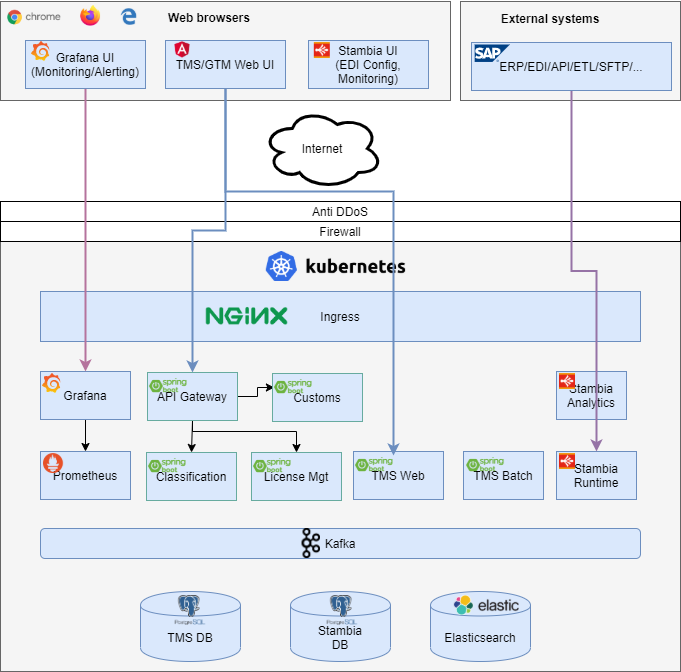
Architecture of a MyTower environment
A MyTower application environment is divided into two parts: TMS and GTM and contains, at least, the software components listed below. A MyTower environment is deployed in a Kubernetes cluster, so all components are packaged as Docker containers.
GTM Components
MyTower GTM follows a Microservices architecture. Each functional module is managed in a separate microservice and there are common microservices shared between all functional services (Master Data and Referential Data). Here is the list of GTM components:
-
Master Data: Customer’s specific master data (articles, parts, etc.)
-
Referential Data: Market data not dependent on the customer (legal regulations, classification rules, etc.)
-
Classification Service: compute/upload/manage lifecycle of classification codes
-
License Management: Export Control Licensing Management
-
Customs: customs management services
-
UROP: Users/Roles/Operations/Permission: Service centralizing the RBAC for all GTM micro-services.
-
GTM View builder: A technical service with an Elasticsearch index to search data across all microservices.
-
API gateway: single entry point simplifying access to the microservices
Technically, all GTM microservices use the Spring Boot and Spring Cloud stack.
Common Components
-
Stambia: the ETL of the MyTower solution. Used for EDI exchanges (WebServices, SFTP, ...)
-
Kafka: Internal messaging between MyTower components. Kafka can also be open to outside customers for message exchange if needed.
-
TMS, GTM and Stambia databases: Three different Postgresql databases.
-
Prometheus and Grafana: Monitoring and technical alerting (cpu, ram, disk, network, ...). Application monitoring is provided by a javamelody component embedded in the TMS instances.
-
Reverse Proxy (Ingress): The main entry point for all MyTower components. This front end manages SSO authentication, access to APIs, and TLS connection termination
Technical requirements for the use of MyTower
From a user perspective, MyTower is a web application that runs in a browser. MyTower is compatible with the following standard browsers: Google Chrome, Chromium, Mozilla Firefox, Microsoft Edge and Apple Safari. No specific browser is required to use MyTower.
To use MyTower, there are also no specific requirements on workstations. The physical requirements (CPU, RAM, ARCHITECTURE) to use MyTower are the same prerequisites for using the web browser that will access MyTower. Any currently supported version of these browsers can be used.